



The ROCCAT brand has gained a lot of attention over the past several years. While the German PC hardware manufacturer has been around for more than a decade, it's only fairly recently that its products have started to appear side-by-side with the likes of Razer and HyperX in comparisons and on store shelves.
Having tested the ROCCAT Vulcan 120 AIMO wired mechanical keyboard, it's clear that ROCCAT has earned its place in the conversation. From its robust design to its top-notch performance, the Vulcan 120 AIMO is a shining example of ROCCAT's engineering capabilities. Unfortunately, excellence on the hardware side is hamstrung by an obtuse software package that fails to live up to the industry standard.
Buy ROCCAT Gaming products
Design
Design
- Slim metal frame is sleek and hardy
- Firm and supportive detachable wrist rest
- Curved keycaps and more-visible status lights are smart tweaks

Read more about the ROCCAT Vulcan 120 AIMO's design
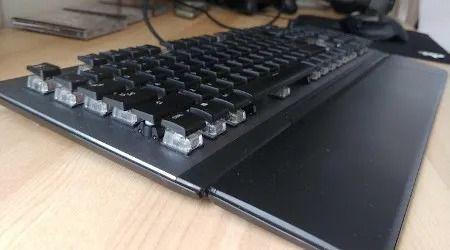
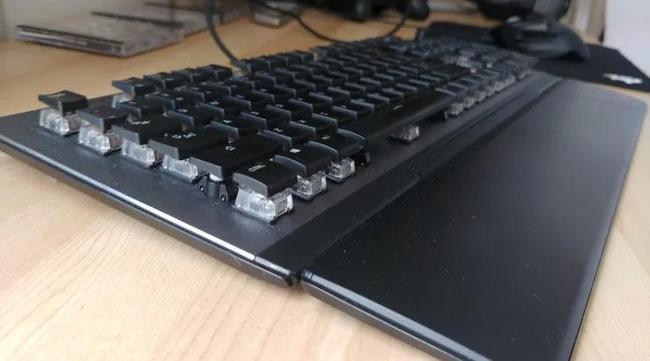
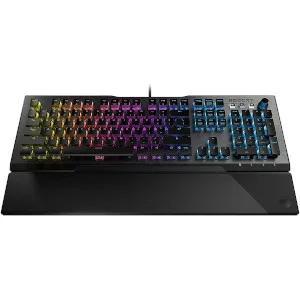
The Vulcan 120 AIMO is one sleek piece of kit. An aluminium plate covers the face of the full-sized keyboard, lending it an elegant sheen while simultaneously protecting it from smudges, scratches and other wear and tear. The board itself feels sufficiently durable, capable of taking its fair share of knocks despite its relatively slim frame. A braided USB cable rounds out the hardy package, reinforcing the internal wiring against snags, tangles and cable-nibbling pets.
There seems to be a growing trend among premium gaming keyboards to ditch boisterous, pseudo-futuristic designs in favour of cleaner and more subdued aesthetics. It's a trend the Vulcan 120 AIMO continues, and one that I greatly appreciate. The simple design is powerful, and it works equally well on a desk at home, at the office or in a public space.
Perhaps my favourite aspect of the Vulcan 120 AIMO's design is its detachable wrist rest. Not only does it provide a smooth and comfortable surface with valuable ergonomic support for your wrists, but it also attaches using a magnetic strip nestled in a groove at the base of the keyboard. This dual-layer approach prevents the wrist rest from slipping horizontally as well as vertically. I was impressed by the stability it offered, especially at times when my hands were flying from one side of the keyboard to the other. And because it's magnetic, you can remove it in a pinch if you're short on desk space.
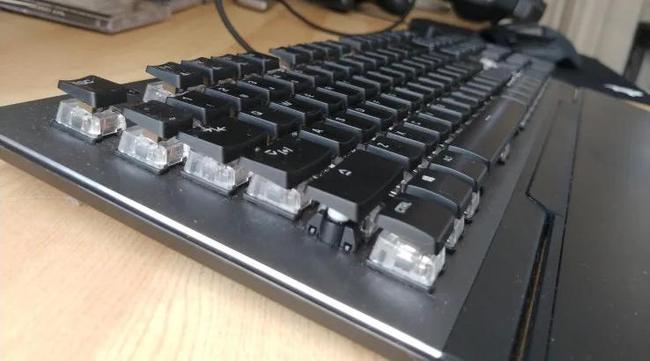
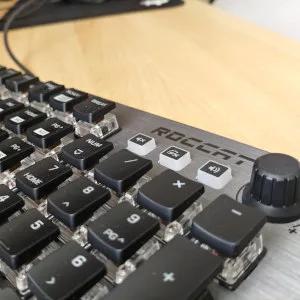
On the smaller scale, the Vulcan 120 AIMO features a number of smart design decisions worth calling out. For instance, its bottom-row keys running from Left Ctrl to Right Ctrl have curved keycaps. The bottom edge is softened so that it doesn't bite into the skin of your resting fingers.
Speaking of keycaps, the Vulcan 120 AIMO's keycaps are thinner than you find on most keyboards. This exposes more of the transparent switch housing beneath the caps, which in turn amplifies the potency of the keyboard's RGB lighting. To prevent airborne contaminants from gunking up the exposed switches, the switch housing is dust-resistant.
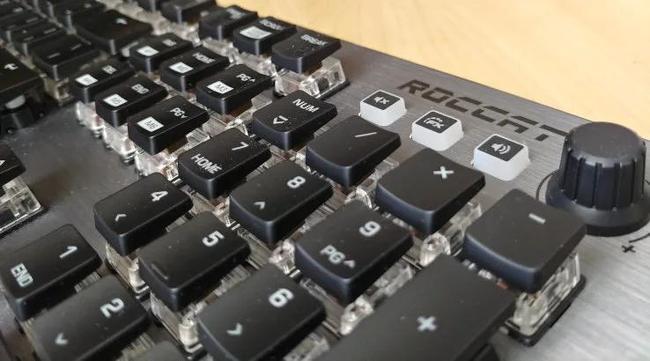
Another novel aspect of the Vulcan 120 AIMO is the positioning of the status lights that indicate when toggles like Caps Lock and Game Mode are active. Instead of sitting above the numpad, ROCCAT has shifted them beneath it. I found this placement easier to check out of the corner of my eye, and it avoids the issue of other keys obscuring the lights from certain angles.
Performance
Performance
- Custom Titan switches deliver reliable and responsive performance
- Firm feedback and good key spacing allows for fast keystrokes

Read more about the ROCCAT Vulcan 120 AIMO's performance
ROCCAT offers the Vulcan 120 AIMO in two variants: one with Tactile switches and one with Linear switches. I tested the Tactile variant, which, as the name implies, goes for the punchy feel commonly associated with mechanical keyboards.
Both the Tactile and Linear switches are built on ROCCAT's custom Titan switch technology, and the Vulcan 120 AIMO is the first keyboard to feature them. ROCCAT's big pitch for the Titan switches is their faster response time. According to ROCCAT, the high-quality components in the switches reduce the mechanical bounce caused by each keystroke. This allows for a shorter debounce delay baked into the switch configuration, leading to what ROCCAT claims is 20% faster recognition of a key press than competing switches.
How does this claim play out in practice? Quite well, it turns out. The Titan Tactile switches deliver crisp, firm feedback on every key press. I had no problems running, jumping and sliding my way around the craggy battlefields of Io in Destiny 2, and I achieved plenty of personal bests in Trackmania – the only racing game where playing with a keyboard isn't complete madness.
Another aspect of the Titan switches ROCCAT specifically calls out is their reduced wobble, and it's noticeable. Even when hammering the keys, they bounce straight back up, delivering consistent feedback regardless of where you press down.
Much like the rest of the board, the keys and their switches feel like they've been designed with durability in mind. I encountered no signs of wear or weakness throughout my testing, giving me confidence that the switches are strong enough to survive plenty of use.
Like most "tactile" keys, the Titan switches do require a good bit of force behind your fingers to maintain a consistent rhythm of key presses. This can get tiring over long gaming or typing sessions, especially if you're new to mechanical keyboards. Keep this in mind if you're weighing up whether to go for the Linear switches or the Tactile ones.
Features
Features
- Tight and precise volume wheel
- Remapping keys is more obscure than it should be
- Plenty of RGB customisation, but AIMO doesn't add much

Read more about the ROCCAT Vulcan 120 AIMO's features
At first glance, the Vulcan 120 AIMO ticks all the boxes you'd expect from a high-end gaming keyboard. Key remapping? Check. Customisable RGB lighting? Check. Support for macros, Game Mode and on-board memory with space for up to four profiles? Check, check and check.
However, dig a little deeper and that apparent versatility starts to break down.
Customising the aforementioned features takes place in ROCCAT's Swarm configuration software. While the interface is relatively intuitive in places, it's frustratingly obscure in others. Take the process of remapping keys. First of all, you can't actually remap the default functions of the Vulcan 120 AIMO's keys. Instead, you define a secondary function that is accessible only when Game Mode is active. It's an unconventional choice that nevertheless works, as odd as it is.
Assigning functions to individual keys is similarly confusing. In theory, you simply select the key you want to map then drag and drop your chosen action from a searchable list. Available actions range from simply mimicking other keys on the keyboard to system-level functions like changing the volume or booting up a particular program. Alternatively, you can really sink your teeth in and build a custom macro, defining a sequence of actions as complex as you'd like.
The problem is, some functions refuse to map to certain keys. The Caps Lock key, for instance, won't accept custom macros or system-level functions. The same goes for Shift, Ctrl, Alt and many others. The Swarm interface doesn't do a great job of communicating which functions can map where, nor does it explain why some keys only support limited functions.
Along with Game Mode mappings, you can define a second set of key bindings for select keys by using ROCCAT's EasyShift feature. Much like Logitech's G-Shift feature, EasyShift gives keys a secondary function accessible while holding down a specific key: the "EasyShift" key. It's the Caps Lock key by default, but you can remap it – assuming the Swarm app will let you.
Here again, functionality is curiously limited. Only a subset of keys supports an EasyShift mapping: the Fn keys, WASD, and a handful of others. Why this is the case when so many other keyboards – Logitech's G915 with its G-Shift feature, for instance – offer full key remapping is baffling.
Other configuration options in the Swarm software are more straightforward. Simple sliders control basic performance settings such as the sensitivity of switch detection and how fast repeat inputs register when holding down a key. You can also add audio feedback to each key press, which is a neat inclusion.
Customising the Vulcan 120 AIMO's RGB lighting is also relatively simple. You can choose from a decent range of lighting patterns including the standard wave, heartbeat and breathing pulse patterns, or you can define your own custom lighting collage by assigning different patterns to specific zones of the keyboard. Whichever pattern you choose, you can customise it further by adjusting its speed, its brightness and the colours it cycles through.
As the name suggests, the Vulcan 120 AIMO supports ROCCAT's AIMO lighting technology. In addition to letting you synchronise lighting across multiple ROCCAT devices, AIMO claims to be an "intelligent lighting system" that changes dynamically based on what you're doing. In my testing, this seemed relatively limited, with the dynamism limited to keys lighting up as I pressed them.
On a more positive note, the Vulcan 120 AIMO sports a handy volume wheel that can serve double-duty as a brightness control for the RGB lighting. Two buttons next to the wheel let you toggle between the modes, and the wheel itself offers enough resistance to allow for precise adjustments.
Should you buy the ROCCAT Vulcan 120 AIMO?
ROCCAT could have had a real gem on its hands with the Vulcan 120 AIMO. From a hardware perspective, it's a tremendously well-built keyboard with a sleek style, a resilient design and tight, responsive switches. On the software side, industry-standard features are either missing, obscured or bizarrely limited in their functionality.
With a similar price tag to keyboards like the Logitech G815 and the HyperX Alloy Elite RGB – both of which are more-complete packages – the Vulcan 120 AIMO is in a tough spot. It's a keyboard with caveats. For some, those caveats will be a cost too steep to pay. For folks who can look past its software shortcomings, though, there's an excellent gaming keyboard waiting to be found.
Pricing and availability

Price
Where to buy
Specifications

Build
Connectivity
Features
Latest Finder reviews
27 Feb 2026
|
Nick Broughall
13 Nov 2024
|
Chris Jager
11 Oct 2024
|
Frank Duignan
02 Nov 2022
|
Alice Clarke
01 Nov 2022
|
Alice Clarke
Sources
Sources
Finder writers are subject matter experts and use primary sources, in-depth research and interviews with other experts to ensure you're getting accurate, up-to-date information. Articles are fact checked in line with our editorial guidelines.