





Handpicked deals, direct to your inbox
Subscribe to the Finder Shopping newsletter for the latest shopping and travel deals
Error placeholder Click here to sign in
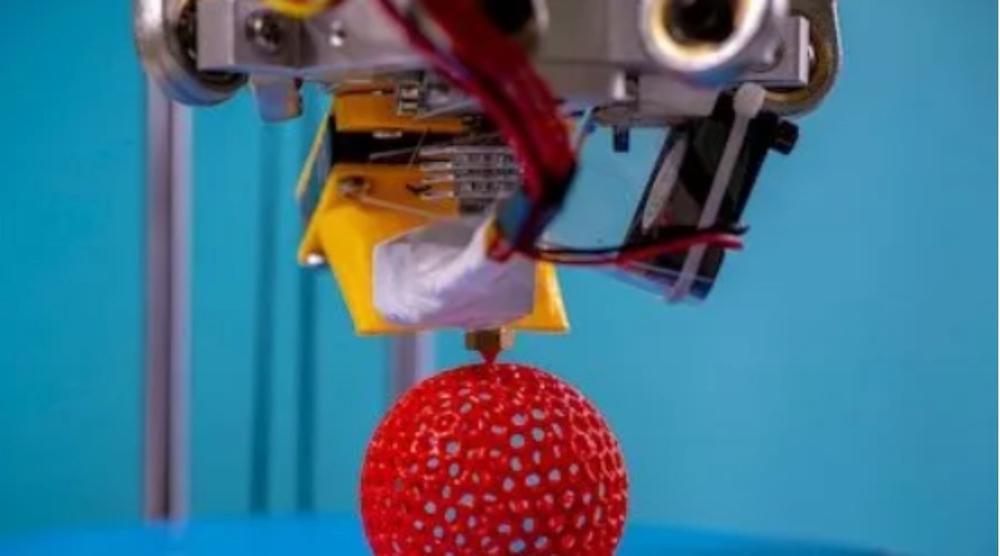
A traditional printer drops ink or toner onto a page, and we're all very familiar with that. A 3D printer doesn't do much differently, save for the fact that it's dropping either filament or resin onto a surface one layer at a time to build a 3D model. If you've ever built with LEGO (and if you haven't, where have you been?), that kind of one-bit-at-a-time building is what 3D printers are all about.
3D printing in one form has been around for decades as additive printing in the industrial space, but over the last decade or so it's taken hold in homes as well thanks to the explosive growth of affordable home 3D printers. Early models used simple plastic filaments extruded from a spool, making them rather like knitting with plastic. Newer models use light-sensitive resins that cure in place for faster and more precise prints, although filament options are still widely available.
3D printing can be an engaging way to indulge your creative side, an easy way to create small bespoke parts or a fine educational tool as well, with lots of schools investing parts of their IT budgets in them. However, 3D printing isn't quite as simple as dropping paper in your printer and flinging a Word document at it. We'll run through the best 3D printers for every need and what you need to know about 3D printers and 3D printing when choosing the right model for you.
These recommendations are based on analysis of professional and consumer reviews available online for a wide variety of models; you can read more about our methodology below.
Anycubic Vyper
Best overall 3D printer

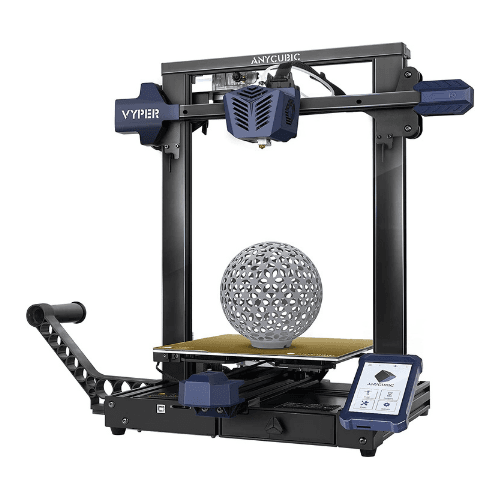
Image: Supplied/Finder
Pros
- Easy to install
- Large build area
Cons
- Can produce some messy prints according to users and reviewers
- Cura software can be hard to get to grips with at first according to reviewers
Buy now
Why we chose it
There's a clear battle line drawn between UV resin printers and more traditional filament printers when it comes to picking the "best" 3D printer you can buy, but we'll give the nod to the filament-based Anycubic Vyper. It meets the needs of more general users while being relatively affordable, reviewing well and dodging the clean-up and fume issues associated with resin-based printing approaches.
Amazon reviewers rated it at 4.5 stars out of 5, with buyers noting that they liked its flexibility, large build capacity and automatically levelling print bed. There is a learning curve to its Cura slicing software, and you'll need to shuffle between your computer and your Anycubic Vyper when it comes time to print, as it lacks direct Wi-Fi printing capabilities.
You'll want to budget for some spare spools of filament as it only ships with a smaller starter quantity, and may need to work a little at more intricate models, but for an ideal balance of large print size, moderate price and generally well reported print quality, it's hard to look past the Anycubic Vyper.
Anycubic Vyper
Best filament 3D printer
Image: Supplied/Finder
Pros
- Easy to install
- Large build area
Cons
- Can produce some messy prints according to users and reviewers
- Cura software can be hard to get to grips with at first according to reviewers
Buy now
Why we chose it
Anycubic's Vyper wins the top nod for best filament-based 3D printer due to its simple operation, generous-sized build area and easy automatic bed levelling as noted by several online reviewers. It's got an average of 4.5 stars according to Amazon consumer reviewers, with buyers noting that it's beautifully flexible, although predictably rather noisy as most open filament 3D printers tend to be.
At 50.8x45.7x51.6cm it is a larger 3D printer with an entirely open frame, and at 10kg it's also not one that you'd want to move around all that much. However, that larger build size does allow for generous model-building capacity, with a build size listed at a maximum of 245×245×260mm. If you're a newbie in the 3D printing game, the auto-levelling bed should minimise the number of misprints as you learn the intricacies of 3D print modelling.
Reviewers did note the lack of any Wi-Fi connectivity, so when you've prepared your prints they have to be manually transferred to the Anycubic Vyper via either SD card or USB drive. The Anycubic Vyper uses the Cura slicing application, with some reviewers noting that Anycubic doesn't provide a lot of instruction in its ongoing use. Some users did note that they had to polish off a few loose filament fibres from more intricate prints as well. The default kit only ships with a small quantity of filament for your first few prints.
Elegoo Mars 2 Mono 3D printer
Best resin 3D printer

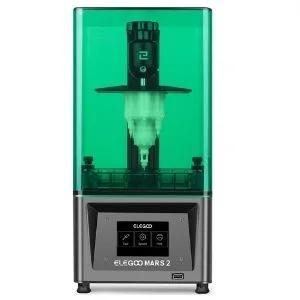
Image: Supplied/Finder
Finder Score:
Pros
- Fine print detail
- Inexpensive
Cons
- Resin is toxic if you don't know what you're doing
- Poor instructions
Buy now
Why we chose it
The Elegoo Mars 2 Mono takes the crown in resin-based printers due to its relatively simple operation and highly affordable initial price point. Assembly is relatively simple with Elegoo including a copy of its Chitubox slicing software on a USB drive in the box that you can also use to transfer your print files to the Mars 2 Mono.
As with any resin printer, you can produce models of incredibly fine detail with the Mars 2 Mono in the resin colour of your choice, although you don't get any included in the box with the standard kit. At 20x20x41cm it's a vertically oriented printer that should fit comfortably on most work benches, although like most resin 3D printers having decent airflow around it is wise due to the presence of resin fumes.
We've reviewed the Elegoo Mars 2 Mono here at Finder and found it to be an excellent printer for its price range and promised feature set, although we did find Elegoo's instructions slightly out of date relative to the firmware on our installed printer, and wished that they had included better and more comprehensive safety instructions as well.
Flashforge Adventurer 3
Best entry-level 3D printer

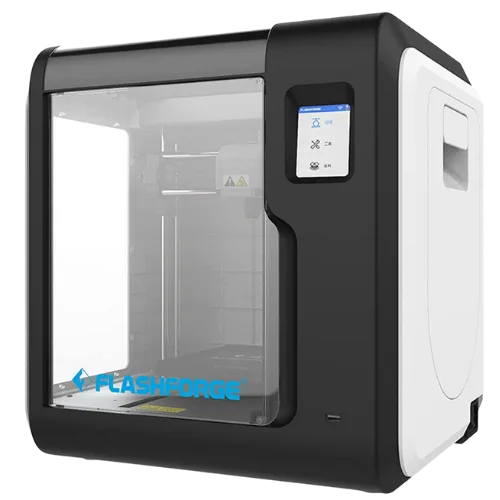
Image: Supplied/Finder
Pros
- Easy to use
- Enclosed build area
Cons
- There are more budget-friendly options available for 3D printing newbies
- Some users report that camera performance could be better
Buy now
Why we chose it
The Flashforge Adventurer 3 grabs the nod for best entry-level choice thanks to its array of helpful features including an auto-levelling tray, automatic broken filament detection and simple set-up. It was also a winner in the 2021 Finder Retail Awards, so there's an established group of satisfied consumers behind the brand.
If you're just starting out with 3D printing, the range of choices and models can be dizzying. You might not think that a 3D printer with the suffix "Adventurer" would be the ideal starting point, because that sounds challenging out of the gate. However, Flashforge's Adventurer 3 has a number of features that reviewers say make it a good starting point for those looking to dip their toes into the world of 3D printing.
You're not just limited to tiny print jobs either, with a print volume of up to 150x150x150mm and layer resolution as fine as 0.1mm. The enclosed nature of the Flashforge Adventurer 3 is a definite plus for beginners, with consumer reviewers noting that they liked the fact that you can monitor build process through your computer hooking into the Flashforge Adventurer 3's onboard camera.
There are some noted limitations, with reviewers picking up on the smaller in-built effective filament spool size at just 500g, although that can be adjusted for. Some new users also found the process of getting filament feed into the Flashforge Adventurer 3 a challenging affair at first. It's also worth noting that Flashforge has updated the nozzle design since the first Adventurer 3 models were produced, so it's worth trying to ensure that you get the newer revision model.
Qidi Tech Shadow 5.5 S
Best budget 3D printer under $300

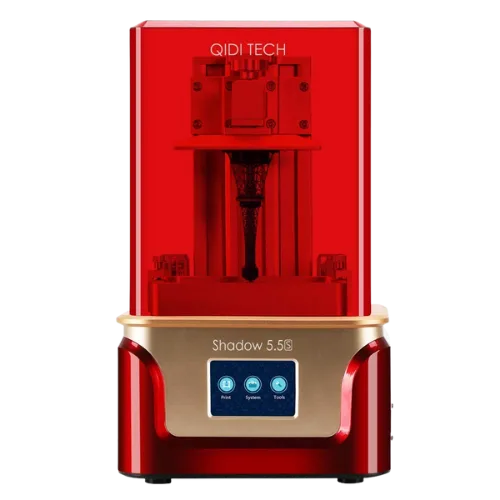
Image: Supplied/Finder
Pros
- Low cost
- Resin included to get you started
Cons
- Noisy fans
- USB only for file transfers
Buy now
Why we chose it
The Qidi Tech Shadow 5.5 S is a low-cost resin-based 3D printer that rates well with consumers, with an average 4.6/5 rating based on 278 worldwide rankings on Amazon. Resin printers are typically the lowest-cost models you can buy right now, and Qidi takes the crown here thanks to its reported print quality at such a low price.
Some users also like the fact that it looks a lot like a certain Marvel superhero, although that's not any kind of official tie-in. For its low asking price, you're getting a 2540x1440 pixel LCD sensor that supports build areas of up to 115x65x150mm, which isn't the largest you can get, but is in line with what you might expect out of a budget 3D printer. What you might not expect given the price is that Qidi actually does include a small quantity of resin in the box, so you can get printing straight away.
On the downside, the Qidi Tech Shadow 5.5 S only uses simple carbon filtering for resin fumes, so it'd be wise to use it in a well-ventilated area, same as other resin-based lithography 3D printers. That's especially true as some reviewers also note that the integrated fume fans can get quite noisy in operation.
How did we pick this list?


Why you can trust our picks
This list was collated using data from professional and consumer reviews of popular 3D printer brands, including from consumer technology publications, direct consumer reviews and ratings on sites such as Amazon and Google. All reviews were checked and cross-referenced to develop a definitive list of the best 3D printers available.
Once that list was finalised, other factors relevant to 3D printing were considered, because the "best" 3D printer for an absolute new user is a very different prospect to the needs of a consumer buying a replacement unit or upgrading their 3D printer based on their expanding 3D print needs.
I've been working as a consumer technology journalist for more than 24 years now, covering printing both in the traditional paper sense and in the 3D printing world for as long as there's been a consumer-facing 3D printer market.
- Anycubic
- BCN3D
- CEL-UK
- Creality
- Dremel
- Elegoo
- Flashforge
- Formlabs
- Lulzbot
- Makerbot
- Monoprice
- Prusa
- Peopoly
- Pulse
- Qidi
- Raise3D
- Snapmaker
- Ultimaker
- XYZPrinting
- ZMorph
Types of 3D printer
The market for consumer 3D printers typically falls between 2 different print approaches.
Filament printers (often called FDM or FFF printers) use a spool of plastic filament fed to a print head that then melts into position, building up a 3D model in an additive way, one blob of filament at a time.
Filament printers offer some flexibility in the materials you use and the colours you can print in, with some models offering dual heads for faster printing of multiple models or mixed material approaches. While the print head does naturally get hot, they're often seen as the safer alternative in 3D printing as the print medium itself is just a simple plastic spool in most cases.
Resin-based printers (typically referred to as SLA, or stereolithography printers) use a liquid resin as the print material, curing each layer of resin in place, typically printing upside down from a raising print plate. The price line between SLA and FDM printers used to favour FDM, but that barrier's been broken by a wide range of budget SLA print models now available. The big advantage that SLA printers have over their FDM counterparts is a notably finer print head size, which means that they can print tinier details and deliver typically smoother finishes over complex surfaces. However, the use of resin does mean that they're using more toxic components that have to be cured after printing, with waste materials that likewise need careful handling and disposal.
How to compare 3D printers
Choosing a 3D printer is a confusing and sometimes overwhelming task. Here are a few key factors you should consider when comparing your options.
Type of printer
The type of printer you choose will be determined by the style of printing you want to do, how often you'll print and your budget. Most affordable 3D printers for home use are FDM printers, but people who want to print in higher resolutions and who aren't constrained by a tight budget may want to opt for an SLA printer.
Ease of use
If you're just starting out in the world of 3D printing, look for a model that requires minimal set-up and no expert knowledge. Some models are ready to print basically straight out of the box and include features like colour touchscreens, self-cleaning functions and auto-bed-levelling to help make them more user-friendly.
Speed
Check the print speed (measured in millimetres per second) to get an idea of a printer's output. However, remember that printing resolution will affect the speed with which you can create an item.
Build area size
Check the specs sheet to find out the maximum object size a 3D printer is capable of creating. Will this be suitable for your needs? As a rough guide, most desktop 3D printers won't create anything larger than 25x25x25cm, with many having smaller build areas than this.
Resolution
Next, check the resolution of the printer, which essentially refers to the height of each printed layer and is measured in microns or mm. A smaller number means a higher resolution; however, higher-resolution printers cost more and usually offer longer print times.
Colours
If you want to print items in multiple colours rather than painting them later, look for a printer with more than one extruder.
Image upload options
Check what options are available for uploading your digital 3D model to the printer. Wi-Fi, cloud connectivity, SD card and USB ports are all commonly included. Some models also come with their own internal memory, while others include a built-in scanner so you can scan items from around your home.
Safety features
If you're concerned about curious kids or your own hands coming into contact with hot printing materials or equipment, look for an enclosed 3D printer. This will also help reduce odours. Other safety features like automatic nozzle cooling and automatic locking doors are useful too, so check the list of product features closely.
Software
The software that comes with the printer should be user-friendly and make it easy for you to manage your print jobs.
Heated print bed
A heated print bed is another useful feature for a 3D printer. This helps prevent the bottom of the object from warping while it is being created.
Warranty
Check the length of the manufacturer's warranty that comes with a 3D printer and exactly what it covers.
Customer support
If you're new to the world of 3D printing, a steep learning curve awaits. It's worth checking how you can contact the manufacturer's support team and whether they actually offer useful after-sales support before you buy.
Reviews
Read independent reviews from other users to find out how the 3D printer performs. Expert tech reviewers can offer useful insight into the printer's features and functions, while reviews from previous buyers will help you learn how a printer stands up to real-world use.
Price
In recent years, 3D printers have become much cheaper than was once the case. You'll now find plenty of entry-level 3D printers available for less than $500, with prices for high-end home-use models running into the thousands.
As well as the up-front cost, you'll also need to think about the ongoing cost of printing materials. Filament for FDM printers is generally cheaper and more widely available than resin for SLA and DLP 3D printers.
What is a 3D printer?
A 3D printer is a device that allows you to create a three-dimensional object. It uses a digital model to make a physical object, building that 3D item by printing one layer at a time.
While 3D printers have many applications in manufacturing and a range of other fields, in this guide, we're focusing on 3D printers for home hobbyists. For example, you might like to use a 3D printer to make personalised gifts for friends, create models for tabletop gaming or reproduce scale models to decorate your home.
What types are available?
There are more than 10 different 3D printing technologies available today, many of them identified by a confusing range of acronyms. But if you're a hobbyist looking for a 3D printer for home use, there are a couple of main options you need to be aware of.
- Fused deposition modelling (FDM). Also known as fused filament fabrication (FFF), this is the most commonly used printing technology in 3D printers for home hobbyists. This technique uses spools of plastic filament, with the filament heated and then extruded to create a 3D object.
- Stereolithography (SLA). Designed for printing finer resolutions, SLA 3D printers use bottles of liquid resin, with the resin converted into plastic using a laser and a process known as photopolymerisation. Digital light processing (DLP) is a similar technology that also relies on resin. SLA and DLP printers sit at a higher price point than FDM models, but they have become much more affordable in recent years.
3 things to consider
There are a few other important factors you should consider before buying a 3D printer:
- Do you really need a 3D printer? If you only need to print an item occasionally, you may be better off using a professional 3D printing service. This allows you to leave your print in the hands of experts and not have to worry about setting up and maintaining your own printer.
- Printing takes time. If you're the type of person who seeks instant gratification, 3D printing may not be the hobby for you. The printing resolution, the size of your object and its complexity can all affect printing speed, but we're talking in terms of minutes and even hours here.
- Think about what you want to print. If you're looking for something to introduce your kids to the world of 3D printing or to make items like cosplay props, there's a good chance an FDM printer will do everything you need. But if you're looking for a model capable of accurately printing intricate details, an SLA model may be a better choice.
If you're ready to start shopping for 3D printers, here's where you can buy 3D printers online.
Frequently asked questions
Do 3D printers require a computer?
You don't need to have a computer to use a 3D printer because most 3D printers have a memory card reader to read and process files for printing.
How much electricity does a 3D printer consume?
3D printers use about 50W per hour on average. However, energy consumption can still depend on the size of your 3D printer and the temperature of its heated bed and nozzle.
Can you use any type of filament on a 3D printer without an enclosure?
3D printers without an enclosure are compatible with PLA, PETG, TPE and TPU filaments. However, ASA and ABS filaments are more suited for models with an enclosure.
How long does it take to print on a 3D printer?
3D printing can take 30 minutes to 12 hours, depending on the type of object you're printing. It can even take a couple of days if you're printing a large, detailed model.
Best-rated 3D printer brand award breakdown
2020 Best 3D Printer brand


Up to 50% off combo printers
Buy combo 3D printers at Creality and enjoy up to 50% discount on selected products. While stocks last. T&Cs apply.
FREE shipping on all 3D printer orders over $30
Shop 3D printers, materials and more at Elegoo and enjoy FREE delivery. T&Cs apply.
Why you can trust Finder Shopping best guides


We're knowledgeable


We're comprehensive

